
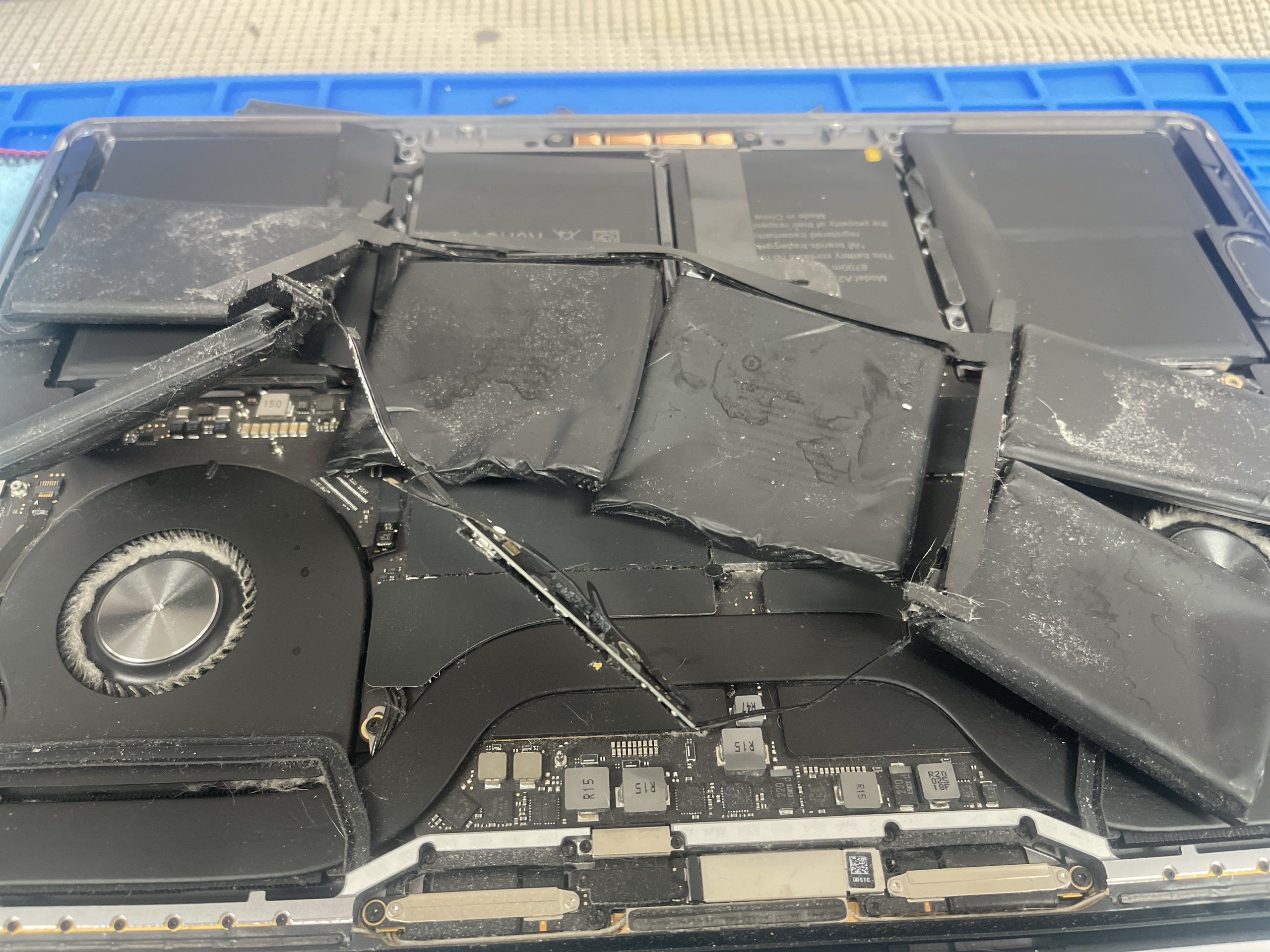
10 Ways to Make Your iPhone and MacBook Battery Last Longer
Your iPhone & MacBook battery can last longer when you use better charging habits, control heat, manage power-hungry apps, and understand battery health. Both iPhone and MacBook batteries naturally age over time, but the way you charge, use, and store your devices can make a meaningful difference to long-term battery performance.
Your iPhone battery or MacBook battery is one of the most important components in your device, but it is also a consumable part that naturally ages over time. How you charge your device, the temperatures it is exposed to, the applications you use, and even where you store it can influence battery performance and long-term battery health.
Many people only think about their battery when an iPhone suddenly starts losing power quickly or a MacBook no longer lasts through the workday. However, developing better charging and usage habits before problems begin can help reduce unnecessary battery stress and keep your device useful for longer.
This guide explains 10 practical ways to make your iPhone and MacBook battery last longer. We will also explain battery health, charging habits, heat, storage, background applications, and when an aging battery may actually need professional replacement.
If your battery has already deteriorated and you are searching for iPhone battery replacement near me, MacBook Air battery replacement near me, or MacBook Pro battery replacement near me, Maple Cell Phone & Laptop Repair provides battery diagnostics and replacement services at 360 Newkirk Rd, Richmond Hill, ON.
Table of Contents
- Why iPhone and MacBook Batteries Wear Out
- 1. Keep Your iPhone and MacBook Away From Excessive Heat
- 2. Develop Better Charging Habits
- 3. Use Apple’s Battery Optimization Features
- 4. Reduce Unnecessary Screen Brightness
- 5. Control Power-Hungry Apps and Background Activity
- 6. Keep iOS and macOS Updated
- 7. Store Your Device Properly When Not in Use
- 8. Use Appropriate Chargers and Cables
- 9. Check Battery Health Instead of Guessing
- 10. Replace a Worn Battery When Necessary
- MacBook Air Battery Replacement
- MacBook Pro Battery Replacement
- iPhone Battery Replacement
- Signs Your Battery May Need Replacement
- Frequently Asked Questions
Why Do iPhone and MacBook Batteries Wear Out?
Modern iPhones and MacBooks use rechargeable lithium-ion batteries. These batteries are designed to be charged and discharged repeatedly, but they do not maintain their original capacity forever. Chemical aging gradually reduces how much energy a battery can store and how effectively it can deliver power.
This is why an older iPhone battery, MacBook Air battery, or MacBook Pro battery may provide considerably less runtime than it did when the device was new.
Battery Life vs. Battery Lifespan
These two terms are easy to confuse. Battery life generally refers to how long your iPhone or MacBook operates before it needs to be charged again. Battery lifespan refers to how long the battery remains useful before aging makes replacement appropriate.
A device that drains quickly does not automatically have a defective battery. High screen brightness, demanding applications, background activity, weak cellular reception, software processes, excessive heat, and other conditions can increase power consumption.
The Goal Is to Reduce Unnecessary Battery Stress
You cannot completely stop lithium-ion battery aging. The practical goal is to avoid conditions that unnecessarily accelerate it while still using your iPhone or MacBook normally.
1. Keep Your iPhone and MacBook Away From Excessive Heat
One of the most important things you can do for battery longevity is manage heat. High temperatures can accelerate chemical aging inside lithium-ion batteries. An iPhone repeatedly left in a hot vehicle or a MacBook regularly operated in conditions that restrict cooling may experience unnecessary thermal stress.
Keep Your MacBook Ventilation Clear
When using a MacBook for demanding tasks, place it on a stable surface where heat can dissipate properly. Soft materials such as thick blankets, cushions, or bedding can make thermal management more difficult.
Dust accumulation can also affect cooling performance on MacBook models that use internal fans. If a MacBook consistently runs unusually hot, the cause may need investigation rather than simply assuming the MacBook Pro battery or MacBook Air battery is defective.
Avoid Leaving an iPhone in a Hot Vehicle
Inside-car temperatures can rise dramatically during warm weather. Avoid leaving an iPhone in direct sunlight or inside a hot vehicle for extended periods.
If your iPhone becomes unusually hot while charging, allow it to cool naturally and investigate if the behaviour occurs repeatedly.
2. Develop Better Charging Habits
There is a lot of confusing battery advice online. You do not need to obsess over every percentage point or constantly unplug your device at an exact battery level. Modern Apple devices have sophisticated charging-management systems.
A more practical approach is to avoid unnecessary extremes whenever convenient and let Apple’s battery-management features do their job.
Do You Need to Drain the Battery to 0%?
No. Regularly draining a modern lithium-ion battery completely just because older battery advice recommended doing so is unnecessary.
Partial charging is perfectly normal. If you have access to a charger during the day, you do not need to wait until your iPhone or MacBook is almost completely discharged.
Charging Should Fit Your Routine
Use your device normally. The objective is not to make battery management inconvenient; it is to avoid repeatedly exposing the battery to unnecessary heat, extreme discharge, or other stressful conditions.
3. Use Apple’s Battery Optimization Features
Apple provides battery-management features on supported iPhone and MacBook models that are designed to reduce battery aging based on charging patterns and device conditions.
Optimized Battery Charging on iPhone
Check the battery settings on your iPhone for the charging and battery-health options available for your particular iPhone model and iOS version. Depending on the model, Apple may provide optimized charging or charge-limit features.
These features can help reduce the amount of time the battery spends fully charged when your normal routine does not require it.
Battery Health Management on MacBook
Modern versions of macOS also include battery-health and charging-management functions on supported MacBooks. Check System Settings > Battery for the options available on your machine.
Allowing the operating system to manage charging intelligently is generally more useful than constantly micromanaging charging manually.
4. Reduce Unnecessary Screen Brightness
The display can consume a significant amount of power. Running an iPhone or MacBook at maximum brightness when it is unnecessary can shorten the amount of time you get from each charge.
iPhone Display Tips
Use automatic brightness when appropriate and reduce brightness manually when you do not need maximum illumination. Features such as Auto-Lock can also prevent the display from remaining active unnecessarily.
MacBook Display Tips
If you are working indoors, you may not need your MacBook display at maximum brightness. Adjusting the display to a comfortable level can improve runtime without affecting normal productivity.
This does not restore capacity to an aging MacBook Air battery or MacBook Pro battery, but it can reduce energy consumption between charges.
5. Control Power-Hungry Apps and Background Activity
Sometimes what appears to be a battery problem is actually unusually high power consumption from software.
Check iPhone Battery Usage
Open your iPhone battery settings and review which applications have consumed the most power. If an application is using an unexpectedly large percentage of the battery, consider whether it needs constant background access.
Background App Refresh, location services, notifications, cellular activity, video streaming, gaming, camera use, and navigation can all affect battery runtime.
Check MacBook Energy Usage
On a MacBook, applications that heavily use the CPU, GPU, network connection, or other resources can reduce runtime considerably. Activity Monitor can help identify applications or processes consuming significant energy or processing resources.
Do Not Automatically Blame the Battery
If battery drain suddenly begins after installing an application or changing software, investigate the software before assuming you need a replacement MacBook Air battery or new iPhone battery.
6. Keep iOS and macOS Updated
Keeping your operating system reasonably current can help with security, compatibility, stability, and power-management improvements.
After a major software update, however, temporary background processes such as indexing, photo analysis, synchronization, and application updates may increase power consumption for a period of time. A temporary increase in battery usage immediately after an update does not necessarily mean the battery suddenly became defective.
When Battery Drain Continues
If severe battery drain continues, check battery usage, battery health, storage, background processes, and device temperature. A proper diagnosis is more useful than replacing parts based solely on one symptom.
7. Store Your Device Properly When You Are Not Using It
If you plan to store an iPhone or MacBook for an extended period, do not simply leave it forgotten in a hot location or allow it to remain completely discharged for a very long time.
Store electronics in a cool, dry environment away from direct sunlight and excessive heat. For long-term storage, follow Apple’s current battery-storage recommendations for the specific device.
Do Not Store a Device With a Swollen Battery
If you suspect a battery is swollen, stop treating the device as a normal battery-maintenance situation. A swollen battery requires careful handling and professional attention.
On an iPhone, swelling may cause the display to lift away from the frame. On a MacBook, battery swelling can potentially affect the trackpad, enclosure, or other components.
8. Use Appropriate Chargers and Cables
Charging equipment matters. Use compatible, properly rated charging equipment from reputable manufacturers and replace visibly damaged cables or adapters.
iPhone Charging
If an iPhone charges intermittently, do not immediately assume you need iPhone battery repair. The problem could involve the cable, adapter, charging port, contamination in the port, battery, or charging circuitry.
MacBook Charging
The same principle applies to MacBooks. A no-charge condition can involve the power adapter, USB-C or MagSafe connection, battery, charging circuitry, or logic board depending on the model and failure.
Accurate diagnosis is particularly important before performing a MacBook Pro battery replacement or MacBook Air battery replacement.
9. Check Battery Health Instead of Guessing
Battery runtime alone does not tell the entire story. Both iPhone and MacBook provide useful battery information that can help determine whether the battery is aging normally or may require service.
Checking iPhone Battery Health
On supported versions of iOS, open the battery settings and look for Battery Health or the corresponding battery-health information for your model. Maximum capacity provides an indication of how the battery’s current capacity compares with when it was new.
Also pay attention to service messages and real-world behaviour. If an iPhone shuts down unexpectedly, drains unusually quickly, struggles to last through normal use, or displays a battery service recommendation, further diagnosis may be worthwhile.
Checking MacBook Battery Condition
macOS can provide information about battery condition and, depending on the model and software version, cycle count and related battery information.
A battery with significant age or wear may eventually require MacBook Air battery service or MacBook Pro battery service.
10. Replace a Worn Battery When Necessary
Good habits can help reduce unnecessary battery wear, but they cannot make a lithium-ion battery last forever. Eventually, chemical aging reduces capacity enough that replacement may make sense.
If the rest of the device is in good condition, replacing a worn battery can often make an older iPhone or MacBook much more practical to use.
Battery Replacement Is Not the Answer to Every Power Problem
This is especially important. A device that will not turn on, will not charge, becomes hot, or shuts down does not automatically need a battery.
Charging ports, power-management circuits, liquid damage, damaged connectors, logic-board faults, software issues, and other problems can sometimes produce symptoms that resemble battery failure.
Professional diagnosis can help determine whether the correct solution is battery replacement or another repair.
MacBook Air Battery Replacement and Service
A worn MacBook Air battery may cause noticeably shorter runtime, frequent charging, battery warnings, or other battery-related symptoms. If battery condition has deteriorated significantly, a MacBook Air battery replacement may restore practical portable runtime.
Customers searching for MacBook Air battery replacement near me or MacBook Air battery service should have the MacBook evaluated if the cause of the problem is uncertain.
When Should You Consider a Replacement MacBook Air Battery?
Consider having the battery checked when the MacBook can no longer provide useful runtime, macOS recommends service, the battery behaves abnormally, or there are signs of physical swelling.
A replacement MacBook Air battery should be selected for the correct MacBook model. MacBook generations differ significantly, so model identification and correct part compatibility matter.
MacBook Pro Battery Replacement and Service
MacBook Pro systems are frequently used for demanding workloads such as video editing, development, photography, design, business applications, and other processor-intensive work. These workloads can consume more energy and generate additional heat.
As the MacBook Pro battery ages, reduced capacity may become particularly noticeable for users who depend on their MacBook away from a charger.
Professional MacBook Pro Battery Replacement
If you are searching for MacBook Pro battery replacement near me, a technician can evaluate battery condition and determine whether replacement is appropriate.
Our Richmond Hill location provides MacBook Pro battery replacement service, Apple MacBook Pro battery replacement, and battery diagnostics for supported MacBook models.
Can You Repair a MacBook Pro Battery?
When customers search for repair MacBook Pro battery, they may actually be experiencing a charging or power problem rather than a repairable fault inside the battery pack itself. In normal service practice, a worn or failed battery pack is typically replaced rather than rebuilt at the cell level. Charging and logic-board faults, however, may require a different type of repair.
iPhone Battery Replacement
An aging iPhone battery can change how practical the phone feels throughout the day. A device that once lasted from morning until evening may eventually require charging several times during normal use.
Before replacing the battery, it is useful to check battery health and battery usage. If battery capacity has deteriorated substantially and the phone otherwise operates correctly, iPhone battery replacement may improve usable runtime.
iPhone Battery Replacement Near Me in Richmond Hill
For customers searching for iPhone battery replacement near me, replace iPhone battery near me, iPhone battery near me, or iPhone battery replacement Richmond Hill, Maple Cell Phone & Laptop Repair provides local battery service at 360 Newkirk Rd, Richmond Hill, ON.
We can evaluate battery-related symptoms and determine whether the battery itself is the likely problem or whether another component requires attention.
iPhone Battery Replacement Toronto Searches
We also receive customers looking online for iPhone battery replacement Toronto and Toronto iPhone battery replacement. Our repair location is in Richmond Hill and serves customers from Richmond Hill and surrounding communities.
For customers north of Toronto, having a local diagnostic and repair option can be convenient when dealing with rapid battery drain, charging problems, unexpected shutdowns, or an aging battery.
Signs Your iPhone or MacBook Battery May Need Replacement
Battery aging does not look exactly the same on every device. However, several symptoms can justify checking the battery condition:
- Battery runtime has become significantly shorter than before.
- The device requires charging much more frequently.
- Battery percentage changes unusually quickly.
- The device unexpectedly shuts down under normal use.
- iOS or macOS displays a battery service recommendation.
- The battery does not charge normally after the charger and connection have been checked.
- The device becomes unusually hot during ordinary use or charging.
- There are signs of battery swelling or physical deformation.
These symptoms are reasons for investigation, not automatic proof that the battery is defective. Diagnosis is particularly valuable when a device has multiple symptoms.
Simple Daily Battery Habits That Can Make a Difference
You do not need a complicated charging schedule to take care of your battery. A few sensible habits can make battery management much easier.
Keep your iPhone and MacBook away from excessive heat, use appropriate charging equipment, enable Apple’s available charging optimization features, keep software reasonably current, reduce unnecessary screen brightness, and periodically check which applications consume the most energy.
Most importantly, use the device normally. A battery exists to power your device. Battery care should improve your experience rather than make you afraid to use your iPhone or MacBook.
Battery Service in Richmond Hill, Ontario
If your battery is already worn, charging slowly, draining unusually quickly, or no longer providing practical runtime, Maple Cell Phone & Laptop Repair provides battery diagnostics and replacement services for supported iPhone and MacBook models.
Location: Maple Cell Phone & Laptop Repair
Address: 360 Newkirk Rd, Richmond Hill, ON
Phone: 416-587-7105
Services include iPhone battery replacement, MacBook Air battery replacement, MacBook Pro battery replacement, charging diagnostics, charging-port repair, and board-level diagnostics when a power problem is not caused by the battery itself.
Frequently Asked Questions About iPhone and MacBook Batteries
1. How can I make my iPhone battery last longer?
Reduce unnecessary screen brightness, check power-hungry applications, use Apple’s available charging optimization features, avoid excessive heat, keep iOS reasonably current, and investigate unusual battery drain rather than ignoring it.
2. How can I make my MacBook battery last longer?
Avoid excessive heat, keep ventilation unobstructed, manage display brightness, identify applications using excessive energy, use compatible charging equipment, and enable the battery-management features available in macOS.
3. Should I charge my iPhone to 100% every time?
You do not need to reach 100% every time you charge. Partial charging is normal for lithium-ion batteries. Supported iPhones also include charging-management features designed to help reduce battery aging.
4. Should I let my iPhone battery reach 0% before charging?
No. There is generally no need to intentionally drain a modern iPhone battery completely before charging it.
5. Is it bad to leave my MacBook plugged in?
Modern MacBooks include charging-management technology, so remaining connected to power does not mean the MacBook is continuously charging the battery without control. However, heat and long-term battery conditions still matter, so use the battery-management options provided by macOS.
6. Why is my iPhone battery suddenly draining fast?
Possible causes include heavy application activity, background processes, location services, weak cellular reception, software changes, high display brightness, heat, or an aging battery. Checking Battery settings can help identify unusually high application usage.
7. When should I consider iPhone battery replacement?
Consider professional evaluation when battery health has significantly deteriorated, runtime has become inconvenient, the phone shuts down unexpectedly, a battery service warning appears, or the battery shows abnormal physical behaviour.
8. When should a MacBook Air battery be replaced?
A MacBook Air battery replacement may be appropriate when battery condition has deteriorated, runtime has become significantly reduced, macOS recommends service, or the battery develops a physical problem such as swelling.
9. Can a bad MacBook Pro battery cause poor runtime?
Yes. As a MacBook Pro battery chemically ages and loses capacity, the computer may operate for less time between charges. However, software activity and power consumption should also be considered before assuming replacement is required.
10. Where can I find iPhone and MacBook battery replacement near Richmond Hill?
Maple Cell Phone & Laptop Repair provides iPhone and MacBook battery diagnostics and replacement services at 360 Newkirk Rd, Richmond Hill, ON. Customers can call 416-587-7105 regarding battery service for their specific model.
Final Thoughts: Make Your Battery Last Longer Without Overthinking It
The best battery-care strategy is surprisingly simple: protect your device from excessive heat, use appropriate charging equipment, take advantage of Apple’s battery-management features, control unnecessary power consumption, and pay attention when battery behaviour changes significantly.
These habits cannot stop the natural chemical aging of an iPhone battery, MacBook Air battery, or MacBook Pro battery, but they can help you avoid unnecessary stress while getting the most practical use from your device.
When a battery eventually reaches the end of its useful service life, replacement can often restore the portability that made the device useful in the first place. And when symptoms do not clearly point to the battery, proper diagnostics can prevent unnecessary part replacement and identify charging, software, or logic-board problems instead.
Need battery diagnostics or replacement? Visit Maple Cell Phone & Laptop Repair at 360 Newkirk Rd, Richmond Hill, ON, or contact our Richmond Hill repair shop or call 416-587-7105 for information about iPhone, MacBook Air, and MacBook Pro battery service.