MacBook Not Charging? 12 Proven Reasons & Expert Fixes (2026)
Table of Contents
- Why Is My MacBook Not Charging?
- 1. Faulty USB-C Charger or MagSafe Charger
- 2. Damaged Charging Cable
- 3. Dirty or Damaged Charging Port
- 4. Battery Health Has Reached Its Limit
- Supported Mac Models
- Professional MacBook Charging Repair
Why Is Your MacBook Not Charging?
MacBook not charging is one of the most common problems Apple users experience. Whether your MacBook battery stays at 1%, the charging indicator never appears, or your MacBook only charges when the cable is held in a certain position, the issue should never be ignored.
Many charging problems begin with something simple like a damaged USB-C cable or worn MagSafe connector. However, other issues may involve the battery, charging IC, USB-C controller, logic board, or liquid damage. Proper diagnosis is essential because replacing the wrong part wastes both time and money.
At Maple Cell Phone and Laptop Repair, located at 360 Newkirk Rd., Richmond Hill, ON, we repair MacBook charging problems every day. Our experienced technicians provide professional diagnostics and board-level repairs for customers throughout Richmond Hill, Maple, Vaughan, Markham, Thornhill, Aurora, Newmarket, and King City.
If your MacBook is not charging, this guide explains the twelve most common causes and what you can do before deciding whether professional repair is required.
1. MacBook Not Charging Because of a Faulty Charger
The charger itself is often the simplest explanation. After years of daily use, Apple chargers may stop providing stable voltage or sufficient current to charge your MacBook correctly.
Common symptoms include:
- Battery percentage never increases.
- Charging starts and stops randomly.
- MacBook only charges after unplugging and reconnecting several times.
- Charging becomes extremely slow.
- Adapter becomes unusually hot.
Always test your MacBook using another genuine Apple charger or a high-quality OEM charger before assuming the computer itself has failed.
Apple also recommends inspecting charging accessories for damage before every use:
2. MacBook Not Charging Due to a Damaged USB-C or MagSafe Cable
A damaged charging cable is another frequent reason a MacBook is not charging. Constant bending near the connector can break the internal wires even when the cable looks normal from the outside.
Look for:
- Frayed insulation
- Loose USB-C connector
- Burn marks
- Broken MagSafe magnets
- Bent connector pins
If moving the cable causes charging to start or stop, replacing the cable is usually the first solution.
3. Dirty or Damaged Charging Port
Dust, pocket lint, pet hair, corrosion, and liquid residue often accumulate inside the charging port. A poor electrical connection prevents the MacBook from recognizing the charger.
Professional cleaning usually restores proper charging, but if the port has suffered physical damage or corrosion, replacement may be necessary.
Our technicians inspect:
- USB-C ports
- MagSafe connectors
- Charging circuitry
- Liquid damage
- Connector solder joints
Never insert metal tools into a charging port because doing so may permanently damage the connector or logic board.
4. Battery Health Has Reached the End of Its Life
Every rechargeable lithium-ion battery has a limited lifespan. After hundreds of charging cycles, battery capacity gradually decreases until the battery can no longer hold sufficient power.
Typical signs include:
- Battery drains very quickly.
- Battery percentage jumps unexpectedly.
- MacBook only works while plugged in.
- Battery Service Recommended warning.
- Battery swelling.
If battery health has deteriorated significantly, replacing the battery restores portability and improves overall performance.
Apple explains battery health and charging cycles here:
Professional MacBook Charging Diagnosis in Richmond Hill
At Maple Cell Phone and Laptop Repair, we diagnose every charging issue before recommending any repair. Our goal is to identify the actual cause instead of replacing unnecessary parts.
Our diagnostic process includes:
- Battery testing
- Charging voltage measurements
- USB-C power negotiation testing
- Logic board inspection
- Microscope inspection for corrosion
- Current consumption analysis
- Thermal camera diagnostics
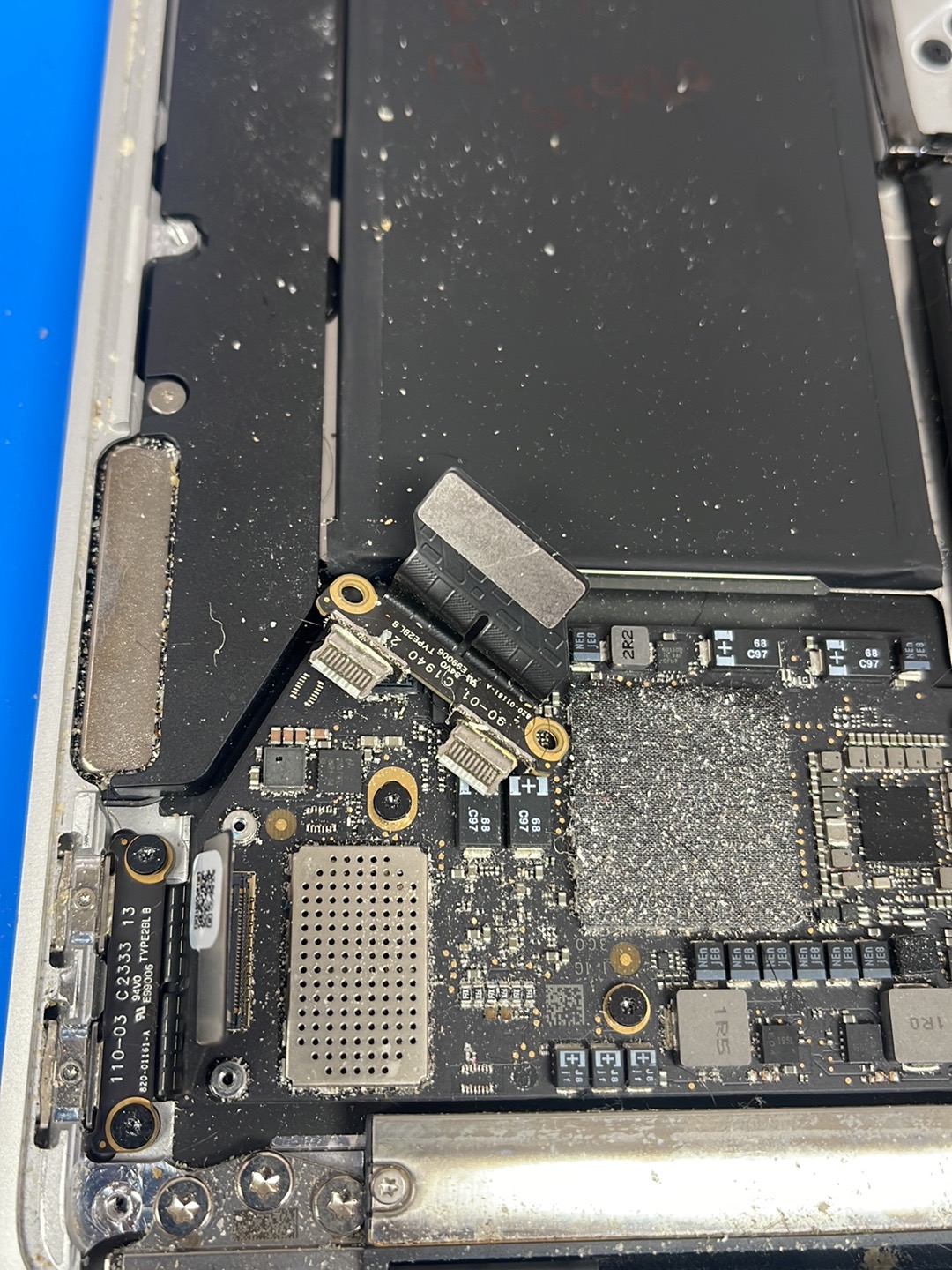
Many customers assume they need a new battery, but the real problem may be a damaged charging IC, USB-C controller, power rail failure, or liquid damage to the motherboard.
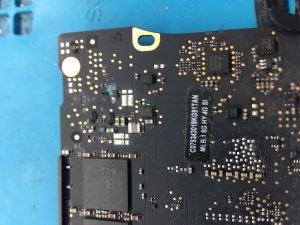
5. MacBook Not Charging Because of a Faulty USB-C Charging IC
If your MacBook is not charging even after trying a different charger and cable, the problem may be the USB-C charging integrated circuit (IC). This tiny chip controls how power enters your MacBook and communicates with the charger.
When the charging IC fails, your MacBook may:
- Show no charging indicator.
- Charge intermittently.
- Charge only from one USB-C port.
- Display “Battery Not Charging.”
- Fail to recognize the charger completely.
Charging IC failures are common after liquid damage, electrical surges, or using damaged third-party chargers. Replacing the charging IC requires professional microsoldering equipment and should never be attempted without proper experience.
6. MacBook Not Charging After Liquid or Water Damage
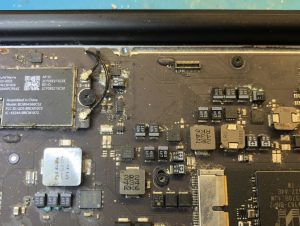
Water damage is one of the most serious reasons a MacBook is not charging. Even a small spill can corrode charging circuits, damage power management components, or short the logic board.
Common symptoms include:
- No charging.
- No power.
- Battery drains rapidly.
- Random shutdowns.
- Keyboard or trackpad stops working.
- USB-C ports stop detecting accessories.
Many people believe putting a wet MacBook in rice will solve the problem. Unfortunately, corrosion continues to spread inside the logic board even after the liquid dries.
The sooner the motherboard is professionally cleaned and repaired, the higher the chance of saving the computer and avoiding expensive component failures.
7. MacBook Not Charging Because the Battery Is Swollen
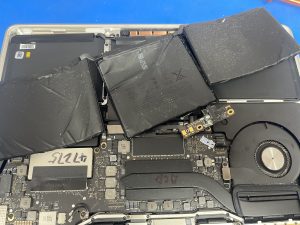
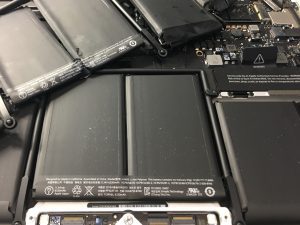
Lithium-ion batteries naturally degrade over time. Older batteries may begin to swell, creating pressure inside the MacBook and affecting normal charging.
Signs of a swollen battery include:
- Trackpad no longer clicks properly.
- Bottom cover appears uneven.
- Keyboard feels raised.
- Battery drains within minutes.
- MacBook only works while plugged into power.
A swollen battery should be replaced immediately because continued use may damage the trackpad, keyboard, display, or internal components.
8. Logic Board Failure Can Prevent Your MacBook from Charging
If every external component checks out correctly, the logic board may be responsible for your MacBook not charging.
The motherboard contains hundreds of tiny electronic components responsible for power distribution throughout the computer.
Some common motherboard failures include:
- Power management IC failure
- Shorted capacitors
- Blown MOSFETs
- USB-C controller failure
- PPBUS_G3H rail failure
- Battery communication circuit damage
Modern MacBooks require advanced board-level diagnostics before replacing expensive parts.
Our Motherboard Diagnostic Process
At Maple Cell Phone and Laptop Repair, every MacBook motherboard undergoes professional testing using specialized equipment.
- Digital microscope inspection
- Thermal imaging camera
- Current draw analysis
- Voltage rail testing
- Ultrasonic cleaning (for liquid damage)
- Microsoldering repairs
These tests help identify the exact failed component rather than replacing the entire logic board unnecessarily.
Prevent Your MacBook Charging Problems
Many charging problems can be avoided with proper care and maintenance.
- Use genuine Apple or high-quality OEM chargers.
- Avoid wrapping charging cables tightly.
- Keep USB-C and MagSafe ports clean.
- Prevent liquid exposure.
- Avoid leaving the battery at 0% for extended periods.
- Install macOS updates regularly.
- Have your MacBook professionally cleaned every few years.
Need Professional MacBook Charging Repair?
If your MacBook still refuses to charge after trying the basic troubleshooting steps, professional diagnosis is recommended.
Our technicians repair:
- Battery replacement
- Charging port replacement
- USB-C board repair
- MagSafe connector repair
- Motherboard repair
- Charging IC replacement
- Liquid damage repair
- Data recovery
Visit Maple Cell Phone and Laptop Repair
360 Newkirk Rd.
Richmond Hill, ON L4C 3G7
Phone: 416-587-7105
We proudly serve customers from Richmond Hill, Maple, Vaughan, Markham, Thornhill, Aurora, Newmarket, and King City.
MacBook Models We Repair for Charging Problems
Our technicians repair MacBook not charging issues across virtually every Apple notebook and desktop Mac. Whether your computer requires a battery replacement, charging port repair, USB-C board replacement, logic board repair, charging IC replacement, or advanced microsoldering, we have the tools and experience to diagnose the problem accurately.
We proudly repair the following Apple devices:
MacBook Pro Models
- All MacBook Pro Models
- MacBook Pro 16″ A3428 M5 Pro / Max
- MacBook Pro 14″ A3426 M5 Pro / Max
- MacBook Pro 14″ A3434 M5
- MacBook Pro 14″ A3112 M4
- MacBook Pro 14″ A3185 M4 Max
- MacBook Pro 14″ A3401 M4 Pro
- MacBook Pro 14″ A2993 M3 Max
- MacBook Pro 14″ A2992 M3 Pro / M3 Max
- MacBook Pro 14″ A2918 M3
- MacBook Pro 14″ A2779 M2 Pro / M2 Max
- MacBook Pro 14″ A2442 M1 Pro / M1 Max
- MacBook Pro 16″ A3403 M4 Pro
- MacBook Pro 16″ A3186 M4 Max
- MacBook Pro 16″ A2991 M3 Pro / M3 Max
- MacBook Pro 16″ A2780 M2 Pro / M2 Max
- MacBook Pro 16″ A2485 M1 Pro / M1 Max
- MacBook Pro 16″ A2141
- MacBook Pro 13″ A2338 (M1 / M2)
- MacBook Pro 13″ A2289
- MacBook Pro 13″ A2251
- MacBook Pro 13″ A1989
- MacBook Pro 13″ A1706
- MacBook Pro 13″ A1708
- MacBook Pro 13″ A2159
- MacBook Pro 13″ A1502
- MacBook Pro 13″ A1425
- MacBook Pro 13″ A1278
- MacBook Pro 15″ A1990
- MacBook Pro 15″ A1707
- MacBook Pro 15″ A1398
MacBook Air Models
- MacBook Air 15″ A3448 M5
- MacBook Air 13″ A3449 M5
- MacBook Air 15″ A3241 M4
- MacBook Air 15″ A3114 M3
- MacBook Air 15″ A2941 M2
- MacBook Air 13″ A3240 M4
- MacBook Air 13″ A3113 M3
- MacBook Air 13″ A2681 M2
- MacBook Air 13″ A2337 M1
- MacBook Air 13″ A2179
- MacBook Air 13″ A1932
- MacBook Air 13″ A1466
Other Apple Mac Models
- MacBook Neo
- MacBook 12″ A1534
- Mac Studio A3143 M4
- Mac Studio A2901 M2 Max / M2 Ultra
- Mac Studio A2615 M1 Max / M1 Ultra
- Mac mini A2943 M4
- Mac mini A2816 M2 Pro
- Mac mini A2816 M2
- Mac mini A2348 M1
Why Choose Maple Cell Phone and Laptop Repair?
When your MacBook is not charging, choosing an experienced repair shop can make all the difference. Instead of replacing expensive parts unnecessarily, we identify the exact cause of the problem using professional diagnostic equipment.
Our repair services include:
- MacBook battery replacement
- USB-C charging port replacement
- MagSafe connector repair
- Charging IC replacement
- Logic board repair
- Motherboard microsoldering
- Liquid damage repair
- SSD upgrades
- Data recovery
- macOS troubleshooting
- Thermal paste replacement
- Internal dust cleaning
Every repair begins with a professional diagnosis so we can recommend the most cost-effective solution.
Internal Resources
If you’re experiencing other MacBook problems, you may also find these repair guides helpful:
- MacBook Screen Replacement
- MacBook Battery Replacement
- MacBook Water Damage Repair
- MacBook Motherboard Repair
- MacBook Data Recovery
Professional Apple Resources
For additional information about MacBook charging, battery health, and Apple recommendations, visit:
These official Apple resources provide additional troubleshooting information and battery care recommendations.
Frequently Asked Questions About MacBook Not Charging
Why is my MacBook not charging even though it is plugged in?
If your MacBook is not charging, the problem could be a faulty charger, damaged charging cable, worn battery, dirty USB-C or MagSafe port, charging IC failure, logic board damage, or liquid damage. Professional diagnostics can determine the exact cause before replacing any parts.
Can a bad battery stop a MacBook from charging?
Yes. An aging or swollen battery may no longer accept a charge or communicate properly with the charging system. In many cases, replacing the battery restores normal charging and improves overall performance.
Should I replace the battery or the motherboard?
Not always. Many charging issues are caused by a damaged charging port, charging IC, or USB-C controller rather than the battery itself. Professional testing is the best way to identify the faulty component.
Can water damage prevent a MacBook from charging?
Absolutely. Liquid damage can corrode the charging circuit, battery connector, USB-C controller, or power management IC. Immediate diagnosis greatly increases the chance of successful repair.
Can you repair MacBook charging problems without replacing the motherboard?
Yes. In many cases, we perform board-level repairs by replacing only the failed electronic components instead of replacing the entire logic board, saving our customers significant repair costs.
How long does MacBook charging repair take?
Most battery replacements and charging port repairs are completed within the same day, while motherboard repairs may require additional diagnostic and repair time depending on the extent of the damage.
Why Customers Choose Maple Cell Phone and Laptop Repair
At Maple Cell Phone and Laptop Repair, we understand how important your MacBook is for work, school, and everyday life. Whether your computer has stopped charging because of a worn battery, damaged USB-C port, faulty charging IC, liquid damage, or motherboard failure, our experienced technicians provide accurate diagnostics and reliable repairs using professional equipment and high-quality OEM replacement parts.
We proudly serve customers throughout Richmond Hill, Maple, Vaughan, Markham, Thornhill, Aurora, Newmarket, King City, Concord, Woodbridge, North York, Toronto, and the Greater Toronto Area.
Visit Us
Maple Cell Phone and Laptop Repair
360 Newkirk Rd.
Richmond Hill, ON L4C 3G7
Phone: 416-587-7105
Website:
https://maplelaptopservices.com/
Final Thoughts
A MacBook not charging does not always mean you need an expensive replacement. Many charging problems are caused by simple issues such as a worn battery, damaged charging cable, faulty USB-C port, or charging IC. Even more complex motherboard faults can often be repaired through advanced board-level diagnostics and microsoldering, helping you save money while extending the life of your Apple device.
If your MacBook is no longer charging or you have noticed intermittent charging, battery warnings, overheating, or liquid damage, don’t wait until the problem becomes worse. Our experienced technicians are ready to diagnose the issue and recommend the most cost-effective repair solution.
Suggested Images
- MacBook not charging diagnostic
- USB-C charging port repair
- MacBook battery replacement
- MacBook motherboard repair
- MacBook water damage repair
- Charging IC microsoldering
- MacBook Pro charging repair
- MacBook Air battery replacement
- Technician testing charging voltage
- Professional repair workstation
Suggested Image ALT Text
- MacBook not charging repair in Richmond Hill
- MacBook battery replacement Richmond Hill
- MacBook USB-C charging port repair
- MacBook motherboard charging repair
- MacBook liquid damage repair
- Apple MacBook charging IC replacement
- MacBook Pro battery replacement service
- MacBook Air charging repair technician
Call Today for Professional MacBook Repair
If your MacBook is not charging, trust the experienced team at Maple Cell Phone and Laptop Repair. From battery replacements and charging port repairs to advanced motherboard microsoldering and liquid damage recovery, we provide dependable Apple repair services backed by professional diagnostics.
📍 360 Newkirk Rd., Richmond Hill, ON L4C 3G7
📞 416-587-7105
🌐 https://maplelaptopservices.com/